


It's 7 AM. The crew is in the driveway. The equipment is still on a truck somewhere.
Nobody did anything wrong, exactly. The job was sold, the visit was booked, and the crew showed up on time. But the one thing that would have caught it, a list of every big job and what each one is waiting on, lived in three people's heads and a whiteboard nobody updated since Tuesday.
That's the problem with project work in a service business. A repair is one visit. A system replacement, a remodel or a commercial install is three, four or six visits spread over weeks, with equipment, permits and crew days that all have to line up. When you have twenty of those going at once, "how's that job going?" stops being a question anyone can answer fast.
In the video below, Skip Stringfield, founder of Smart Service, walks through the Project Timeline board in a little over two minutes.

Why big jobs slip
Big jobs rarely fail all at once. They slip one small miss at a time:
- Equipment that was ordered but never confirmed as received
- A crew booked on a day the job wasn't ready for
- A visit that got canceled and never rebooked
- A no-show nobody followed up on
- A week that looked open on the calendar but was already spoken for
Each one costs a crew day. Crew days are the one thing you can't buy back. If your install crew loses two days a month to jobs that weren't ready, that's two days of contract value you didn't get to.
The four numbers to check before Monday
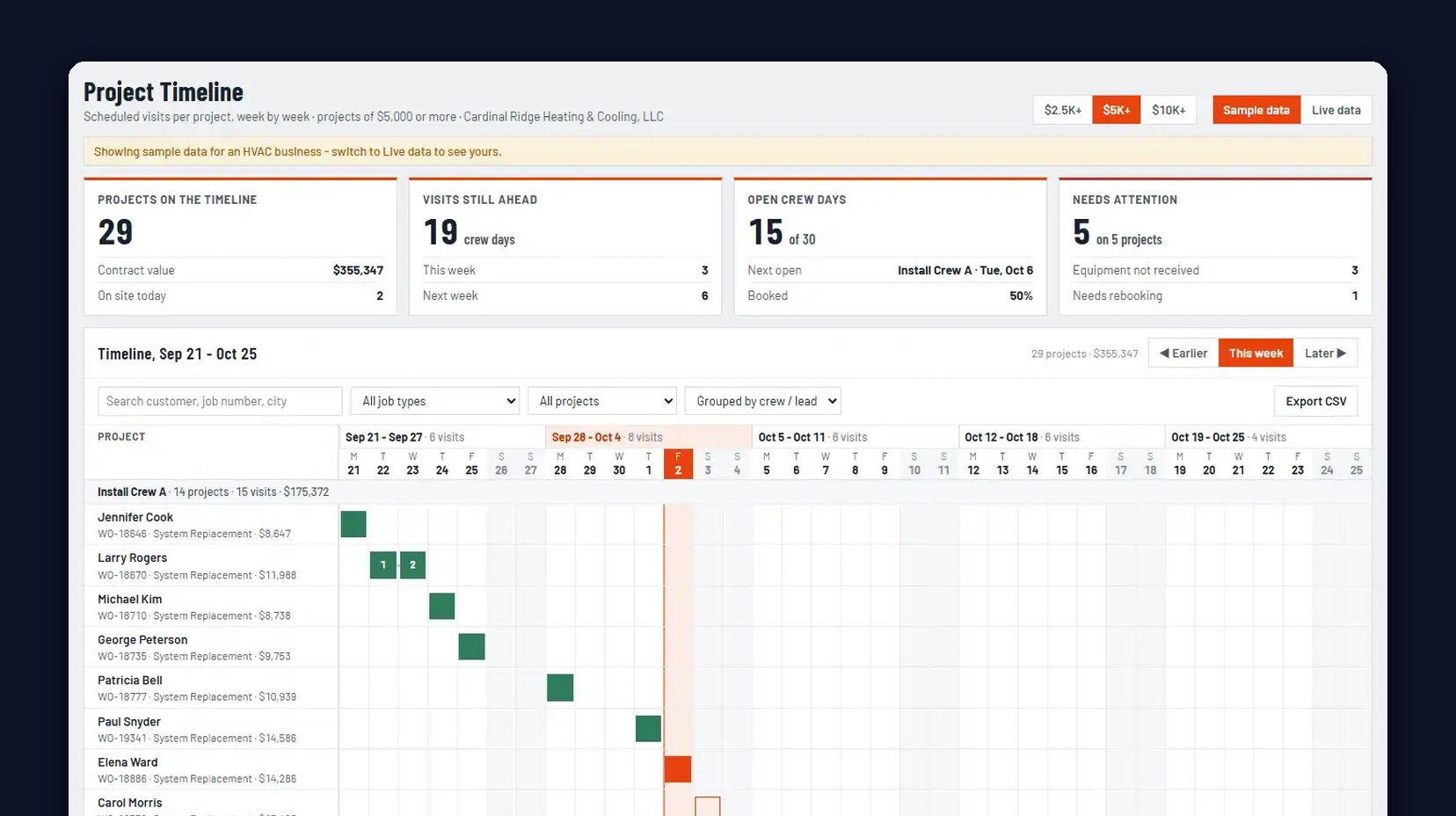
You don't need a report to run your projects. You need four numbers, at a glance:
- Projects on the timeline, and their total contract value. How much work is actually in flight right now.
- Visits still ahead, counted in crew days. How much work is left, split into this week and next week.
- Open crew days. How many crew days you still have to sell or fill, and when the next open one is.
- Needs attention. Which projects are stuck, and why: equipment not received, or a visit that needs rebooking.
If those four numbers are on one screen, you can run Monday's meeting in five minutes. If they live in four places, the meeting takes an hour and somebody still finds out about the equipment at 7 AM.
Split your projects by size
Not every project deserves the same attention. A $2,600 job and a $14,000 system replacement shouldn't sit in the same pile.
Skip divides his projects into small, medium and large: over $2,500, over $5,000 and over $10,000. Flip between them and the numbers change with you. In his walkthrough, the board shows 37 projects over $2,500, 27 over $5,000, and 23 over $10,000, and those 23 alone carry $302,000 in contract value.
That last number is the one an owner should know without looking it up. It's how much money is riding on the jobs that can least afford to slip.
How to read a project timeline
Below the numbers, every project gets a row, and every visit gets a box on the calendar. One look tells you where each job stands:
- Green: milestones that are completed
- Solid red: a crew is on site or en route right now
- Outlined: visits that are scheduled
- Canceled means canceled
- No show needs attention
Group the rows by crew or crew lead, and you can see in seconds whether one crew is stacked three deep next week while another has open days.
Put it on the wall
Skip's advice is simple: put the project timeline up on a big screen in your office.
When the board is on the wall, nobody has to ask where a job stands. The dispatcher sees the open crew days. The office sees the projects that need attention. The owner sees the contract value. Everybody knows exactly what's going on at a glance, and the job waiting on equipment gets caught on Thursday, not at 7 AM in a customer's driveway.
Where this fits with your other numbers
Project work is where cash gets tied up the longest. A big install can be weeks between the first visit and the final invoice. If you're watching your project timeline, watch your cash too. Here's how owners read revenue against cash collected: revenue vs. cash flow. And if new work isn't coming in fast enough to fill your open crew days, start with your booking rate.
Project Timeline is part of Smart Service Cloud. If you want to see your own projects on the board, book a demo.
FAQ
What is a project timeline in a service business?
It's a board that shows every multi-visit job you have going, with each visit placed on a calendar and color-coded by status. Instead of opening jobs one at a time, you see all of them, and which ones are stuck, on one screen.
How do I know how many crew days I have left?
Count the scheduled visits still ahead on your open projects, split by this week and next week. On a project timeline that number sits at the top of the board, next to how many open crew days you still have to fill.
What should I do about jobs waiting on equipment?
Flag them before the visit, not on the day. A "needs attention" list that shows equipment not received lets the office move the crew to a job that's ready instead of sending them to one that isn't.
Should small jobs go on the project timeline?
Usually not. Most owners set a floor, like $2,500, $5,000 or $10,000, so the board shows the jobs where a lost crew day costs the most.


