


HVAC inventory is the most expensive part of a service business that nobody actually tracks. The average residential service truck carries $15,000 to $25,000 in parts, supplies, and refrigerant. A five-truck shop has $100,000 or more rolling around the city on any given day, plus another $200,000 to $1 million in warehouse stock if the business does install work. Software-driven inventory management cuts truck and warehouse stock by 25 to 40% on average, eliminates the most common source of operational waste, and ties parts usage to specific jobs so the gross-margin math actually works. The guide below walks through what HVAC inventory looks like, what bad inventory costs, what the software needs to do, and how the workflow runs in Smart Service.
What HVAC Inventory Looks Like
HVAC inventory splits into three buckets that need different management approaches.
Truck stock. The fast-moving parts the tech keeps on the truck for everyday service calls: capacitors, contactors, fan motors, refrigerant, transformers, igniters, thermostats, common filter sizes, basic copper fittings and line sets. Typical truck stocks 150 to 300 SKUs at a total value of $15,000 to $25,000, per ACCA industry benchmarks. The fastest movers turn over weekly.
Warehouse stock. The bulk inventory for install work and special-order parts: condensers, air handlers, furnaces, ductwork, larger refrigerant tanks, manufacturer-specific repair kits. Warehouse value scales with install volume, from $50,000 for an install-light shop to $1 million-plus for high-volume installers. Refrigerant inventory carries additional compliance weight under EPA Section 608 rules.
Customer-owned equipment. Not technically inventory, but tracked in the same system. The condensers, air handlers, and furnaces installed at customer sites that produce the recurring service revenue. See the companion guide on HVAC equipment tracking for the customer-equipment side.
The Cost of Bad Inventory
Inventory mistakes show up in the P&L in five predictable places.
Second trips. The tech arrives at the job, discovers the part is not on the truck, drives to the supply house, drives back. Two hours of billable time turns into one hour of billable plus an hour of drive time. At a $150 hourly bill rate, every avoidable second trip costs the business $150 to $300 in unrealized revenue.
Shrinkage. Parts that leave the truck or warehouse and never get billed to a job. Often a few percent of total inventory value annually for operations without tight tracking. On $500,000 in total inventory, that is $10,000 to $25,000 a year in pure loss.
Carrying cost on dead stock. Old inventory that does not move ties up working capital and accumulates tax exposure. A real-world example from eTurns TrackStock: one HVAC service company reduced line items per truck from 315 down to 150-175, cut per-truck inventory from $20,000 to $14,000, and shrunk warehouse stock from $1.6 million to $875,000. The freed-up working capital and reduced carrying cost ran into the hundreds of thousands of dollars a year.
Stockout-driven customer churn. A customer who waits two weeks for a part the company should have stocked is a customer who calls a competitor next time. Stockout-driven churn is invisible on the P&L but real.
Tax exposure. Per IRS inventory rules, inventory on hand at the close of the tax year is part of cost of goods sold and affects taxable income. Stagnant inventory on the books is taxable inventory until it sells or gets written off.
What Inventory Software Should Do
A working HVAC inventory system handles seven things, even if the names vary by vendor.
Multi-location tracking. Warehouse, truck, and customer site, all in the same system, all in real time.
Per-tech truck assignment. Each tech is responsible for their own truck stock, with usage tied to their work orders.
Work-order assignment. Every part used on a job is tagged to the work order, which both invoices the customer correctly and accounts for shrinkage by leaving no part untracked.
Reorder thresholds. Per-SKU minimum stock levels that trigger an automatic reorder alert when supply drops below the threshold.
Cost and markup tracking. The system stores cost basis per part and applies markup automatically to invoiced parts, so the gross margin per job is visible without spreadsheet math.
Mobile capture. The tech updates inventory from the truck via a mobile app rather than waiting to update from the office at the end of the day.
Accounting integration. Inventory updates flow into QuickBooks so the balance sheet, cost of goods sold, and tax math are accurate without double entry.
How It Works in Smart Service
Smart Service builds inventory management into the same workflow as scheduling, dispatch, and work orders. The dispatcher sees what is on each truck before assigning a job, the tech sees what they have available before quoting a repair, and the office sees the full warehouse-plus-fleet inventory in one view. The screenshot below shows the inventory assignment screen on a work order.
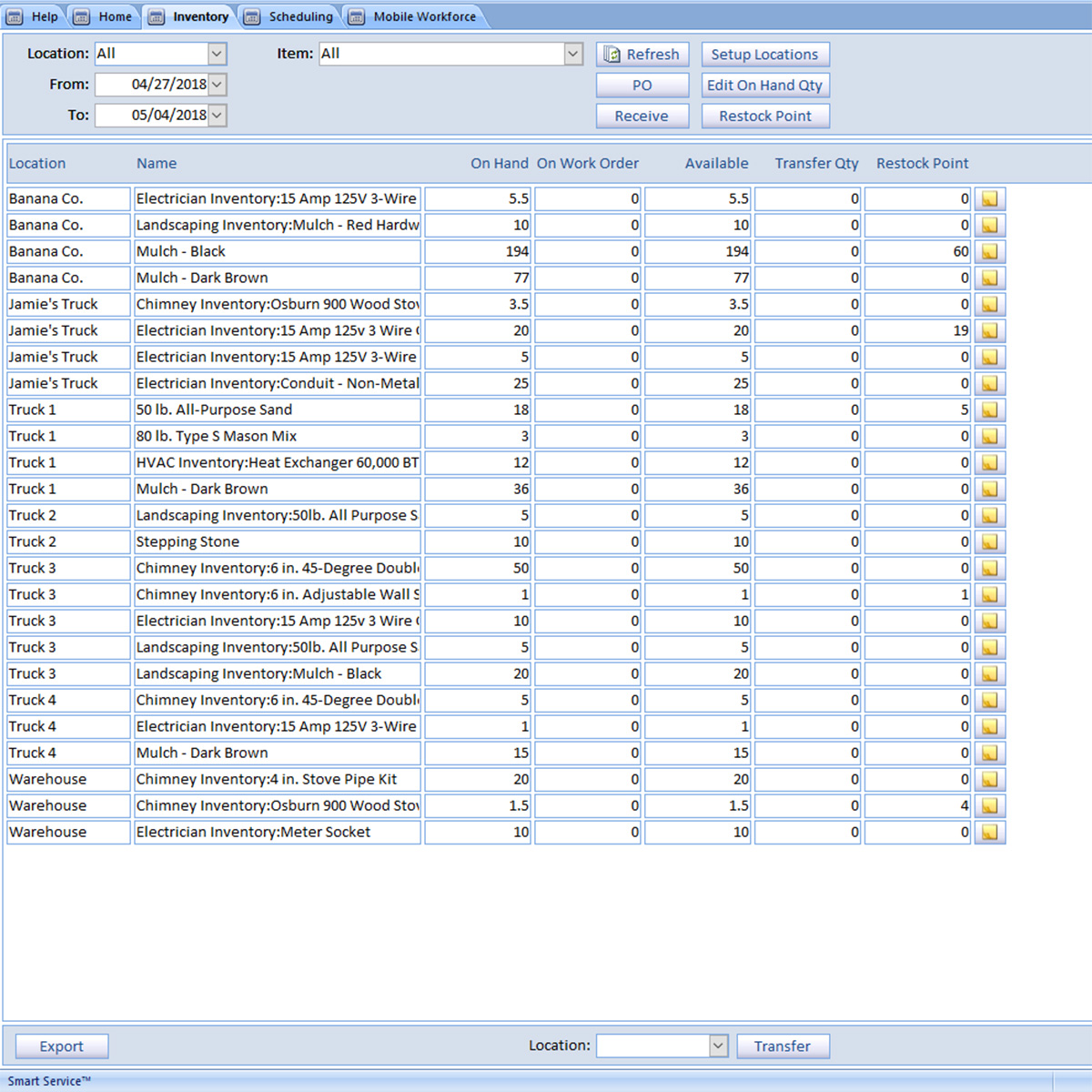
If the part is not in stock, the system blocks the assignment, which prevents the second-trip scenario before it happens. Reorder thresholds are configurable per SKU. The screenshot below shows the restock-point configuration screen for a single part.

The full inventory workflow is available across both Smart Service products. Smart Service Desktop pairs with QuickBooks Desktop, and Smart Service Cloud works with QuickBooks Online, QuickBooks Desktop, or as a standalone platform, with a real-time two-way sync and the latest mobile and reporting features. Both share the same inventory engine, work-order tie-in, and reorder-alert system.
Reporting for Marketing
Inventory data does double duty as a marketing asset. The same system that tracks parts usage also tracks what customers bought, when, and from which tech. A report that filters customers by recent purchase of a specific HVAC unit pulls a clean target list for service-contract sales or seasonal maintenance promotions. The screenshot below shows the parts-filter step of building one of those reports.

The output is a customer list that can be exported and dropped into the marketing email tool of choice for a targeted campaign.

Filter-driven marketing converts better than generic email blasts because the message is matched to the customer's actual purchase history. Filters can run by service date, equipment age, manufacturer, or any combination, which is the same data the inventory system is already capturing.
Mobile Tracking on the Truck
The truck side of the inventory system runs through the iFleet mobile app. Techs scan or select parts as they use them, the inventory count on the truck updates in real time, and the dispatcher's view back at the office reflects exactly what is rolling around the city at any given moment. Combined with GPS, the office can see both the location of each truck and the parts inventory on it. The screenshot below shows the dispatcher's view of an active fleet.

The combination of GPS and per-truck inventory means the dispatcher can route the closest tech who also has the right part on board, rather than the closest tech who then has to stop at the supply house. That single dispatch optimization is one of the highest-leverage things a small HVAC shop can do to improve daily revenue per truck.
Stocking the Truck
HVAC inventory management is the operational discipline that turns a shop running on memory into a shop running on data. Done well, it cuts truck and warehouse stock by 25 to 40%, eliminates second trips, makes shrinkage visible, and pulls double duty as the marketing list for the next service campaign. The biggest near-term opportunity for most operations is the per-truck reorder discipline, where each tech is responsible for replenishing their own stock based on actual usage. Two companion reads worth pointing at on the same blog: a guide to HVAC equipment tracking for the customer-equipment side of the record, and the broader field service management overview for the operational stack as the business scales.
Smart Service for HVAC
If you are running an HVAC company and want HVAC business software that handles scheduling, dispatch, customer history, mobile invoicing, recurring service contracts, and inventory management out of the box, Smart Service integrates with QuickBooks Desktop and QuickBooks Online, and the iFleet mobile app keeps techs synced with the office. Try a free demo to see how it fits!

.png)
